Roth conversion software projects how much of your pre-tax savings to convert each year and what that does to your taxes over decades. The Roth Conversion Explorer in the Boldin Planner runs those numbers against your whole retirement plan. It suggests a conversion schedule and applies it to a scenario you can test.
A Roth conversion means paying tax now so you owe less later, and a completed conversion can’t be undone. Getting the amount wrong costs money in either direction. Spreadsheets show the tax on a single conversion. They miss how that income ripples into Medicare premiums, Social Security taxes, and required minimum distributions (RMDs) years later.
The right amount depends on years you haven’t lived yet: when you claim Social Security, when RMDs start, and what Medicare will charge. Laying out those years side by side turns a hunch into a decision you can explain.

Boldin members lean on these tools. In a survey of Boldin subscribers, 93% said they’d used the Explorer or Money Flows to test conversion strategies. Here’s what good Roth conversion software can model for you, how the Boldin Planner handles each step, and where its limits are.
What Does Good Roth Conversion Software Model?
Roth conversion software has to project your whole retirement, year by year, to give you a useful answer. A conversion raises your income in the year you make it, and that income touches several other bills.
- Every income source. Wages, pensions, Social Security, required minimum distributions (RMDs), and withdrawals all fill the same tax brackets a conversion uses.
- Brackets that move with inflation. Tax brackets and Medicare thresholds rise most years, so a 30-year projection needs them to rise too.
- Medicare surcharges. IRMAA adds a surcharge to Part B and Part D premiums based on your income from two years earlier.
- Taxes on Social Security. Up to 85% of your benefits can become taxable as your other income rises.
- The net investment income tax. A conversion raises your modified adjusted gross income (MAGI). MAGI decides whether your dividends, interest, and gains owe the 3.8% net investment income tax (NIIT). It applies above $200,000 for single filers and $250,000 for joint filers.
- Where the tax money comes from. Paying conversion tax from savings outside the IRA moves more money into the Roth.
- What your heirs inherit. A traditional IRA passes its income tax bill to whoever inherits it. A Roth IRA doesn’t.
Tools that skip these pieces can make conversions look better or worse than they are. Advisors who review conversion tools flag two common flaws. Some look at one IRA and ignore the rest of your finances. Others hold tax brackets and IRMAA tiers at today’s levels.
The Boldin Planner projects income, Social Security, RMDs, and taxes in every year of your plan. Its tax projection includes capital gains, IRMAA, the NIIT, and the 10% additional tax on early withdrawals from pre-tax accounts. The Roth Conversion Explorer runs on those same projections, so its suggested schedules reflect all of them.
How Does the Roth Conversion Explorer Work?
The Roth Conversion Explorer tests schedules against your plan, suggests a yearly amount, and shows the effect on your estate and lifetime taxes. You choose one of four strategies. Two are goal-based and search for the best result, and two are rule-based and follow a limit you set.
| Strategy | How it works | Fits if you want |
|---|---|---|
| Highest Estate Value | Tests every federal bracket and keeps the one that leaves the largest estate | The largest projected estate, before heirs’ taxes |
| Lowest Lifetime Tax Liability | Tests every federal bracket and keeps the one with the lowest lifetime taxes | The smallest tax bill over your lifetime |
| Tax Bracket Limit | Converts up to the top of a bracket you choose each year, from deductions only (0%) to 35% | A steady, predictable conversion pattern |
| IRMAA Bracket Limit | Converts up to the top of an IRMAA tier you choose each year | To hold down Medicare premium surcharges |
The goal-based strategies can return few conversions, or none, when converting doesn’t beat leaving the money where it is. The rule-based strategies return a schedule every time, since you set the ceiling. That schedule can leave a smaller estate or a bigger lifetime tax bill than a goal-based run.
Each run starts fresh. The Explorer sets aside any future conversions already in your scenario and builds new suggestions. Those older conversions stay in your plan until you apply the new ones.
The Planner also shows a Roth opportunity estimate on the Overview page and in the Financial Wellness metric “Roth Conversion Opportunity for Maximizing Estate Value.” Both use the Highest Estate Value strategy and your plan’s current rates setting. They can differ from a strategy you’ve run yourself.
Which accounts does the Roth Conversion Explorer convert?
The Explorer converts from your tax-deferred accounts, starting with the one that has the highest rate of return. It draws on both spouses’ accounts in that order, and you can’t pick the source account. If an account can’t be converted, exclude it from your withdrawal strategy or give it a lower return.
Converted money goes to a Roth account in your plan. If you don’t have one, the Explorer creates one with Boldin’s default 8.08% return. To set the Roth’s return yourself, add a placeholder Roth account before you run the Explorer. Giving your pre-tax and Roth accounts the same return keeps the comparison about taxes alone.
How Do You Set Up a Roth Conversion Scenario in Boldin?
You set up a conversion scenario in a copy of your plan, after checking the inputs that drive your taxes. This order keeps your baseline plan intact:
- Update the inputs behind your taxes. Check your retirement date, income, Social Security claiming age, and longevity. Review your return, inflation, and tax settings under My Plan > Assumptions > Taxes. Your withdrawal order matters too, since it sets how much income you draw each year.
- Add cost basis to taxable accounts. Capital gains and the net investment income tax both depend on it, and both can change what a conversion costs.
- Duplicate your baseline scenario. Run the Explorer in the copy, so your baseline stays your plan of record.
- Enter this year’s conversions. Already converted some money this year? Add it to the copy under My Plan > Money Flows > Transfers, dated when it happened, and update your account balances. The Explorer counts it and suggests what’s left to convert for the year.
- Open the Explorer and pick a strategy. Go to Explorers in the Planner’s left-hand menu on a desktop or tablet, then choose the Roth Conversion Explorer. Pick one of the four strategies in the table above.
- Choose which accounts can pay the conversion taxes. You’ll pick one of two options before the Explorer runs. The one marked default, “Pay taxes from cash and taxable accounts only,” stops suggesting conversions once those accounts run out. The other lets tax-deferred accounts pay, which leaves less to reach the Roth and adds income tax, plus the 10% additional tax before 59½.
- Check your one-time expenses and transfers. The Explorer won’t suggest a conversion that would leave an account short of a planned expense or transfer from it. Fund those expenses from your withdrawal order to give conversions room. If you plan to add new transfers, run the Explorer first.
Two details trip people up. If your withdrawal order is customized, only the tax-deferred option is available. To protect an emergency fund, hold it in a separate cash or taxable account marked “Exclude from withdrawals” in Assets and Debts.
What Do the Roth Conversion Explorer’s Results Show?
The Explorer’s results compare your current plan with an optimized plan that includes the suggested conversions. A summary shows the number of conversions, the change in your estate, and the taxes saved over your lifetime.
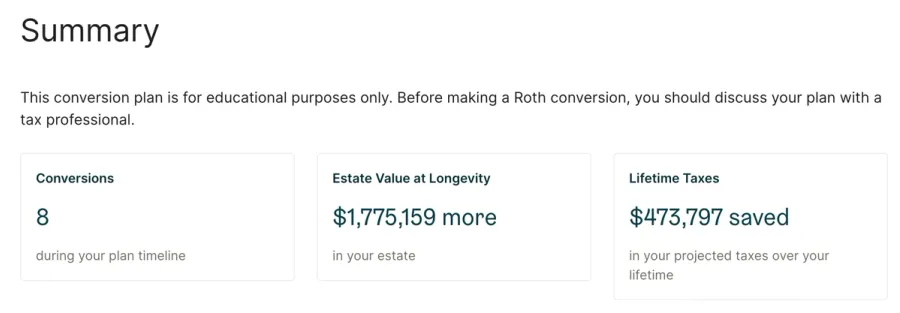
Below the summary, charts and tables compare the two plans year by year:
- Conversion amounts by year and by account
- Projected Roth and pre-tax account balances
- Taxes owed each year and over your lifetime
- Your effective tax rate each year and across your lifetime
- IRMAA surcharges with and without conversions
- RMDs with and without conversions
Read the estate figure with care. It’s the gap in projected savings at the end of your plan, in future dollars. Boldin shows balances at face value, so $1 million in a traditional IRA counts the same as $1 million in a Roth. Your heirs would owe income tax on the traditional IRA, which gives the Roth more value to them than the chart shows.
Lifetime taxes and year-by-year cash flow give a steadier read on whether a schedule fits your life.
How Do You Apply Suggested Roth Conversions to Your Plan?
You apply the Explorer’s suggestions to your scenario in one step. The conversions land as transfers, which you can review under Money Flows > Transfers. Each one shows its amount, year, source account, and destination account.
You can edit any transfer or delete one with the trash icon. To start over, rerun the Explorer in the same scenario and apply again. Applying new suggestions replaces the old conversions, except ones dated earlier this year.
Once conversions are in your plan, the plan pays their taxes the way it pays every tax bill. It uses income first, then withdrawals in your withdrawal order. The account choice you made in the Explorer applies only to its suggestions.
Want a taxable account to cover the tax when your order starts with tax-deferred money? Put a cash account first in your withdrawal order. Then add a transfer from the taxable account into it for the tax amount.
Applied conversions don’t update when your plan does. Say a $50,000 conversion in 2030 filled the 24% bracket, and a later plan change leaves only $30,000 of room. That leaves $20,000 of the conversion in the 32% bracket, because the Planner applies the old schedule to your new numbers.
Rerun the Explorer after any big plan change, and treat each schedule as a draft you’ll revise. Tax law changes too, and Boldin updates the Planner’s tax rules when it does.
You can also talk through a strategy with Boldin AI. With PlannerPlus, it can apply the conversions you discuss to your plan on your behalf.
How Can You Compare Roth Conversion Strategies?
The clearest comparison keeps each strategy in its own copy of your Boldin plan. Leave your baseline with no conversions, then duplicate it twice. Fill to the 12% bracket in one copy and to 22% in the other. Toggle among the three to compare lifetime taxes, net worth, and cash flow.
Test the schedule against a rougher future too. The Explorer starts with the rates assumption your plan already uses: Optimistic, Average, or Pessimistic. On the results page, switch the “Rates: Inflation and Returns” setting to Pessimistic and rerun to see whether the conversions still help. A schedule that holds up across several futures deserves more confidence than one that works only in the average case.
What Doesn’t the Roth Conversion Explorer Model?
The Explorer leaves out a few costs, rules, and personal details. Plan around these on your own:
- ACA premium tax credits. Higher income can shrink or erase a marketplace subsidy before Medicare. Add the lost credit to your plan as an expense to see its effect on a conversion.
- The five-year rules. Each conversion starts its own five-year clock for withdrawals before 59½. The Explorer doesn’t track it, so time withdrawals around the Roth five-year rules.
- College financial aid. Conversion income counts in financial aid formulas, which can cut a student’s aid.
- Future tax law. The Explorer uses today’s tax rules, and Congress can change them.
- Who inherits your accounts. The Explorer doesn’t know your beneficiaries or their tax brackets. Converting can help heirs who’ll pay a higher rate than you do now. It helps less if a charity, which owes no income tax, will inherit the IRA.
None of these rule out conversions. They’re reasons to review a schedule year by year before you act on it.
Can the Roth Conversion Explorer Recommend Not Converting?
The Explorer can come back with a short schedule or an empty one, and that’s a useful answer. Goal-based strategies suggest a conversion only when it beats leaving the money in pre-tax accounts.
Converting tends to help less when you expect a lower tax rate later or need IRA money to pay the tax. Large conversions can cost more in IRMAA or lost ACA credits than they save.
If a rule-based run suggests big conversions, compare it with a Highest Estate Value or Lowest Lifetime Tax Liability run before you commit. The difference between the two shows what the limit costs or saves you.
How Do You Size This Year’s Roth Conversion?
This year’s conversion depends on your income so far and the room left in your bracket. Conversions count for the year they’re completed, so the deadline is December 31.
After you enter conversions completed earlier in the year, the Explorer’s current-year suggestion shows only what’s left under your strategy.
For a quick check on one year, the Roth conversion calculator shows the tax, bracket, and IRMAA effect of a single conversion this year.
What Other Roth Questions Can You Test in Boldin?
Is a Roth or a traditional account better for your savings?
If you’re still saving, the Boldin Planner can compare Roth and traditional contributions. Send future contributions to a Roth in one scenario and to a traditional account in another. Then compare wealth, taxes, and spending power side by side.
Can you model a one-time conversion?
You can add a single conversion in any future year as a transfer under Money Flows > Transfers. Choose the source account, the Roth account, the amount, and the year. Then check how your taxes, RMDs, and net worth respond.
How Do You Get Started With Roth Conversion Planning?
Start with a copy of your plan, run two strategies, and compare what each one leaves you. Roth conversions play out over decades, and the best schedule for you depends on your whole plan. The Boldin Planner builds your retirement one year at a time. The Roth Conversion Explorer shows whether converting pays off, and in which years.
Roth Conversion Software FAQ
What does Roth conversion software do?
Roth conversion software takes your balances, income, and tax assumptions and returns a year-by-year conversion schedule. Planning-grade tools tie that schedule to a full retirement projection, so each year’s tax reflects your other income in that year. Single-year calculators show the tax on one conversion, in one year.
Can a Roth conversion be undone?
A Roth conversion can’t be undone once it’s complete. The Tax Cuts and Jobs Act ended recharacterizations of conversions starting in 2018, so the tax is locked in once the money moves. Modeling the amount before you convert is the main protection against converting too much in one year.
How is a Roth conversion taxed?
A Roth conversion is taxed as ordinary income in the year it’s completed, at your federal rate plus any state income tax. The amount that lands in the Roth counts as a conversion, so it avoids the 10% additional tax before 59½. Tax withheld from the conversion counts as a withdrawal and can owe that 10%.
Do Roth accounts have required minimum distributions?
Roth IRA owners don’t take required minimum distributions during their lifetime, and Roth 401(k)s dropped them starting in 2024. Converting pre-tax money shrinks the balance that sets future RMDs. Most heirs who inherit a Roth IRA have to empty it within 10 years, tax-free once the five-year rule is met.
Do you need a financial advisor to plan Roth conversions?
Many people plan Roth conversions on their own with retirement planning software, then ask a CPA or CFP® professional to review the schedule. A second look helps most in years with a large conversion, a home sale, or a move to another state. A reviewer can also confirm how your state taxes conversions.