Quick answer: Boldin is the strongest choice for full, ongoing retirement planning. It connects taxes, Social Security, healthcare, and withdrawal strategy in one plan. An AI assistant answers from your actual numbers. Need pure day-to-day budgeting instead? Monarch or Quicken handle that.
A full retirement plan touches more than your bank balance. Budgeting, investment tracking, taxes, turning savings into income, and the big questions behind all of it: when can you retire, how much do you need, will your savings last.
This piece compares 13 of the best retirement planning tools against Boldin. We drew on independent reviews, user feedback, and what each tool is built to do.
Boldin vs. the Alternatives: Quick Comparison
| Tool | Best known for | How it differs from Boldin |
|---|---|---|
| ProjectionLab | Manual modeling with historical backtesting | No AI, no advisor access, limited account linking |
| Pralana Gold | Spreadsheet-based planning in Excel | Steeper learning curve, no linked accounts or AI |
| MaxiFi | Optimizing a single sustainable spending number | No free tier, no AI, no CFP advisory |
| Right Capital | Professional planning software for advisors | Requires going through an advisor to access |
| Empower | Free investment tracking and fee analysis | Limited retirement income planning, no Roth or tax strategy tools |
| Fidelity | Basic free retirement planning tied to your Fidelity accounts | Less comprehensive, may prompt sales outreach |
| Income Lab | Dynamic income and spending strategy, built for advisors | Advisor-only; no direct consumer or DIY tier |
| EMoney | Professional planning software for advisors | Advisor-only access; deep but not consumer-facing |
| MoneyGuide Pro | Professional planning software for advisors | Advisor-only access |
| Monarch Money | Budgeting and net worth tracking | Not built for retirement income, Roth, or tax strategy |
| Quicken | Historical budgeting and transaction tracking | Backward-looking, not built to project your future plan |
| FireCalc | Free, simple historical simulation | One-page tool, no saved data, no guidance |
| OnTrajectory | DIY projection tool | No dedicated Roth conversion optimizer; advisor access runs through a separate referral program, not an in-house CFP® |
What Boldin Does Best
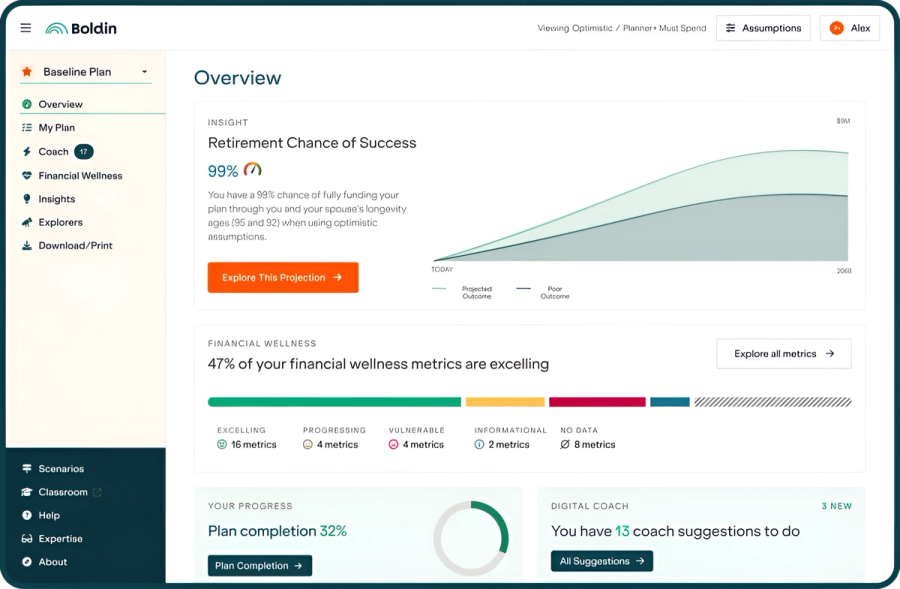
Boldin connects taxes, Social Security, Medicare, and withdrawal strategy inside one plan. You skip reconciling separate tools yourself. Independent reviewers and users point to the same strengths:
- Boldin AI: answers planning questions using your actual plan data, and on PlannerPlus can draft updates to your plan for you to review before anything applies
- Monte Carlo scenario planning that handles more “what if” variables than most other tools on this list
- Retirement Chance of Success scoring, backed by Monte Carlo simulation across 1,000 market scenarios (PlannerPlus)
- Roth Conversion Explorer with four optimization strategies (PlannerPlus)
- Investments feature, linking or manual entry sorted into 8 asset classes across every account (PlannerPlus)
- Full tax planning and optimization, including Medicare and IRMAA cost projections
- A holistic financial wellness assessment across 15+ metrics
- Support that goes beyond software: live classes, coaching, and a flat-fee CFP® through Boldin Advisors
Basic is free to start. PlannerPlus adds Monte Carlo simulation, the Roth Conversion Explorer, and unlimited Boldin AI for $144 a year. It comes with a 14-day free trial. See current pricing and the full feature comparison.
Boldin vs. ProjectionLab
ProjectionLab is a modeling sandbox. It’s powerful for building your own projections by hand. But it’s built around manual entry and single-tool depth, not a connected system. Its free tier includes Monte Carlo simulation and historical backtesting.
It stops short of a full planning system in a few ways. Account linking is limited; most entry is manual, by design. And even when you do enter holdings, ProjectionLab treats them as a stock-and-bond assumption rather than real per-position allocation data the way Boldin’s Investments feature now does.
There’s also no AI layer to answer questions about your plan or act on it. Boldin’s model works differently: tax, Social Security, Medicare, and withdrawal sequencing live in one plan that updates as your numbers change. Boldin AI works from your actual data.
Cost: Free; Premium is $129 a year.
Read the full comparison of Monte Carlo methodology, tax planning, and withdrawal-phase modeling in ProjectionLab vs. Boldin.
Boldin vs. Pralana Gold
Both Boldin and Pralana Gold are detailed, powerful planning tools built for individuals. The real difference is the interface. Pralana runs as a guided Microsoft Excel spreadsheet, with lengthy documentation to walk you through it. It’s comprehensive, but interpreting the output falls on you. There’s no AI to ask, no live account view, no plan that updates itself.
Boldin is a web-based, connected experience. You get in-app help, a searchable help center, live and recorded classes, and an AI layer that answers questions about your actual plan.
Cost: About $99 as a one-time purchase (Pralana’s web-based Online tool, a separate product, runs $89–119 a year as a subscription).
Boldin vs. MaxiFi
MaxiFi and Boldin both run tax projections, Social Security claiming strategies, and Monte Carlo simulations. That’s the baseline math any serious retirement tool runs. The two tools split on what they do with those numbers. MaxiFi is an optimizer. It takes your inputs and returns a single number: the highest sustainable spending level your income and assets can support. Boldin is a planning system built around your full financial picture. It produces a Chance of Success score and guidance you can revisit as your situation changes.
Harry Sit of The Finance Buff bought MaxiFi Premium to model a real housing decision. He ran straight into the tradeoff in its Monte Carlo output: a spending range swinging from $50,000 to $200,000 a year, depending on market returns. There was no clear signal for which number to plan around. As he put it, “So do I spend $50,000 or $200,000?” Jim Dahle of The White Coat Investor calls MaxiFi “a worthy competitor.” But he names Boldin “the first one you should check out” and “certainly the only one you need.” He adds that the plan it generated was “far higher” in quality “than I have seen come from many professional financial advisory firms.”
Cost: Standard is $109 a year; Premium, which adds Monte Carlo and the Roth Optimizer, is $149 a year.
Read the full comparison of consumption-smoothing versus Chance of Success methodology in MaxiFi vs. Boldin.
Boldin vs. Right Capital
Right Capital is built primarily for financial advisors managing client plans, not for someone building their own. The scenario tools and tax modeling are genuinely strong, but reaching them usually means going through an advisor first.
A Reddit user testing both directly found less of a gap for hands-on scenario work: “In my experience, Boldin was more flexible and intuitive.”
Cost: Available primarily through financial advisors.
Read the full comparison in RightCapital vs. Boldin.
Boldin vs. Empower
Empower, formerly Personal Capital, is one of the most widely used free retirement tools. Its strength is investment monitoring: account aggregation, fee analysis, asset allocation tracking, and net worth dashboards. Its Retirement Fee Analyzer flags hidden fund costs, something Boldin doesn’t offer an equivalent for.
Empower falls short on planning depth. It doesn’t model withdrawal sequencing, Roth conversion windows, or tax strategy across future years. Those are the decisions that matter most in the years around retirement. On the investment side, Boldin’s Investments feature, on PlannerPlus, classifies whatever you connect or type in by hand into 8 asset classes, though Empower offers fee-analysis and performance-history that Boldin doesn’t yet.
Rob Berger has used Empower for over a decade to track his portfolio and evaluate fees. He calls it “the absolute best investment tracking app” for that purpose. But for his own retirement planning, he uses Boldin.
Eric Rosenberg, writing at The White Coat Investor, draws a similar distinction. Boldin suits action-oriented financial planning. Empower stands out for investment analysis and wealth management.
Cost: Empower’s tracking and planning tools are free. Its optional wealth management service starts at a tiered 0.89% AUM fee, with a $100,000 minimum. That rate steps down to 0.49% on dollars above $10M.
See the full comparison of planning depth, Roth strategy, and advisor access in Empower vs. Boldin.
Boldin vs. Fidelity’s Retirement Planning Tool
Fidelity offers low-cost investments and a straightforward planning tool alongside them. It doesn’t go as deep as Boldin on comprehensive, ongoing planning.
Rob Berger, reviewing Fidelity’s retirement calculator, calls it “a very easy to use tool to get a rough, and I stress rough, idea of your retirement readiness,” and makes the broader point that “a retirement calculator, in contrast to a retirement planner, can only do so much.” Fidelity’s tool also works from a single profile. Change an assumption and it overwrites what you had, with no way to hold two scenarios side by side. Boldin lets you build and compare multiple scenarios at once. That includes Roth conversion and Social Security timing questions Fidelity’s tool doesn’t model.
Cost: Free. Registration is required if you don’t already hold a Fidelity account. You may get sales outreach depending on your asset levels.
Boldin vs. Income Lab
Income Lab is retirement income planning software built for financial advisors. It’s priced at $199 to $299 a month for practices. The focus is dynamic spending strategies and ongoing plan monitoring, not a one-time projection. There’s no direct consumer or DIY tier.
Boldin is built for individuals, without needing an advisor relationship to access the software. If you’re comparing the two because an advisor mentioned Income Lab, start with Boldin’s Basic plan on your own. Decide later whether you need professional guidance layered on top.
Cost: Not available directly to individuals; priced for advisor practices.
Boldin vs. eMoney
eMoney is an enterprise platform built for wealth management firms. It’s optimized for cash-flow modeling and advisor-facing client presentations, not for day-to-day use by an individual running their own numbers.
One investor compared their CFP’s eMoney output against their own Boldin plan and found the two converged closely: “so now the two software are remarkably similar.” The difference came down to control. Boldin let them adjust Roth conversion timing and spending directly, without waiting on an advisor to rerun the model.
MoneyGuide Pro, another advisor-only platform, follows a similar pattern. It leans on visual probability-of-success scores rather than granular tax and withdrawal mechanics, and shows up often at firms like Schwab. One user had a Schwab advisor run a MoneyGuide Pro analysis alongside their own plan in NRP, Boldin’s product under its earlier name, and found the two held up well against each other: “I had my Schwab account manager run their Money Guide pro analysis and NRP compared very well.”
Cost: Both are available only through a financial advisor.
Boldin vs. Monarch Money
Monarch Money is a budgeting and net worth tracking tool. It’s closer in scope to Quicken or Mint than to a retirement planning platform. It’s added basic goal tracking and long-term net worth projection. But it doesn’t model Social Security claiming strategy, Roth conversions, or tax-bracket withdrawal sequencing. That’s the retirement-specific planning Boldin’s tools handle.
Cost: Free for basic tracking; the paid tier runs $99 a year.
Boldin vs. Quicken (and Other Budgeting Tools)
Quicken, like Empower, serves a different purpose than Boldin. It’s built for tracking transactions and historical spending. Boldin’s budgeting tools exist too, but the focus is projecting spending forward, not reconciling what already happened. Quicken also asks you to enter a manual tax rate to model retirement income. Boldin calculates taxes automatically each year against current law, including scheduled changes.
Cost: Quicken Simplifi runs roughly $48 to $72 a year; Quicken Classic runs roughly $48 to $96 a year, depending on tier.
Other budgeting-focused platforms worth knowing about: Monarch Money, Tiller, Rocket Money, and YNAB.
Boldin vs. Traditional Financial Advice From a Human
A good advisor brings real value. You get intuition built from experience, a broader view of your options, and reassurance that’s hard to get from software alone. But traditional advice comes with real tradeoffs. It’s often cost-prohibitive. Annual or quarterly meetings don’t answer the weekly “what if” questions that come up between visits. And it can be hard to find an advisor who understands your values and covers more than savings and investments.
Cost: Traditional financial advice typically runs into the thousands of dollars a year, depending on the scope of service.
Boldin vs. FireCalc
FireCalc is where people go to sanity-check a number, not to build a plan. It’s a free, one-page tool: answer a few questions, and it charts hundreds of possible outcomes based on historical market data. FireCalc’s own site frames the read this way — don’t follow any single line; look at the mass of lines against the zero axis to see how often a strategy would have failed or succeeded.
FireCalc doesn’t save your data between visits, model taxes or Roth conversions, or account for Social Security claiming age. It isn’t built to.
Cost: Free.
Boldin vs. OnTrajectory
OnTrajectory is a DIY projection tool, lighter in scope than Boldin. It’s useful for modeling income, expenses, and goals on your own. It has less built in for the choices that matter most as retirement gets close. Its paid Unlimited plan ($80–99/year) adds Monte Carlo simulation and historical backtesting. It also includes an AI assistant, Penny, for basic guidance and getting started.
What it doesn’t have: a dedicated Roth conversion optimizer comparable to Boldin’s Roth Conversion Explorer, or an in-house path to a CFP®. Advisor access instead runs through a separate referral and affiliate program. Boldin’s AI works differently, too. Rather than general guidance, Boldin AI answers from your actual plan data. On PlannerPlus, it can draft updates to your plan for you to review. Roth strategy, Monte Carlo, tax planning, and CFP® access all live together in one connected plan.
Cost: Free tier available; the Unlimited plan runs $80–99 a year.
Which Retirement Planning Software Is Right for You
- Want comprehensive planning and full control over every lever affecting your financial security? Boldin is built for that.
- Already using a tracking or budgeting tool and just need the planning layer on top? Boldin’s free Basic plan works alongside whatever you’re already using.
- Already working with a financial advisor? Compare what they offer against a 14-day free trial of PlannerPlus.
- Looking for a single calculation rather than a full plan? See the 10 best retirement calculators.
Frequently Asked Questions About Best Retirement Planning Software
What is the best retirement planning software?
Boldin is the strongest overall choice for comprehensive, ongoing retirement planning. It connects taxes, Social Security, healthcare costs, and withdrawal strategy in one plan. An AI assistant answers using your actual numbers.
Is retirement planning software worth paying for?
Paid retirement planning software earns its cost once your situation has moving parts a static number can’t capture: Social Security claiming age, Roth conversion timing, healthcare costs, or sequencing withdrawals across several accounts in retirement. Free tools cover a single point-in-time estimate: how much you might need, or whether your current savings are on track.
Is Boldin better than Empower?
For planning, Boldin is better than Empower. Empower is built for free investment tracking and fee analysis, and does that well. Boldin goes further into retirement income planning, Roth conversion strategy, and tax modeling. Many people use both for different purposes.
How does Boldin compare to financial advisor software like Right Capital or MoneyGuide Pro?
Right Capital and MoneyGuide Pro are both professional tools, typically accessible only through an advisor. Boldin is built for a different audience: the individual managing their own plan. It covers the same core decisions (tax strategy, Social Security timing, Roth conversions) without requiring that advisor relationship.
Is Boldin the Same as NewRetirement?
Boldin used to be called NewRetirement. The name changed; the platform and tools carried over.